
Blackwell Picks Favorites:
Qwen 3.5 35B A3B
Here's our next ByteShape release: Qwen 3.5 35B A3B. With the 9B model, behaviour across GPUs was fairly consistent while CPUs had differing preferences. For this 35B model, it is almost the reverse: CPUs are surprisingly consistent, while GPUs are much pickier about which quantized models run best on each card.
That is why we are presenting models a bit differently this time. In the GPU charts, we highlight the models that are the best match for each specific card and gray out the ones that are not really the right choice. There is no single GPU pick that works best everywhere, but once you know your hardware, the right options become fairly clear.
We also have a step-by-step tutorial on how to run our models locally with OpenCode.
And… as always, … be careful with any tool you choose to grant access to.

TL;DR
On CPUs, the picture is clean. ByteShape models trace a very consistent speed versus quality frontier across the i7, Ryzen 9 5900X, Ultra 7, and even the Raspberry Pi 5, so the recommendations barely change from one system to another.
On GPUs, device-specific optimization matters a lot more.
- RTX4090/ RTX 5090/ RTX 6000 Blackwell:
GPU-7is the clear choice offering all-around excellent balance of token and prompt processing speed and near baseline quality. - RTX 4080/ RTX5060Ti:
GPU-5is an excellent choice balancing quality and speed. If you need a smaller model to support longer context lengths,GPU-4is also a great option. - CPUs:
CPU-5is our top recommendation for maximum quality. If you want faster prompt processing and token generation while still maintaining high output quality,CPU-4is a strong alternative.
GPUs
The graphs for this release provide more nuanced guidance on model selection for two main reasons:
- Unlike the usual pattern, where the same ByteShape models perform well across GPUs, Blackwell shows a much stronger preference for specific datatypes.
- We typically recommend models that balance quality with both prompt processing and token generation speed. In this release, however, we add a bit more flavour with some models intentionally prioritizing output quality and token generation speed over prompt processing. Since prompt processing is usually about 20× faster than token generation, trading some prompt processing for better generation speed and higher quality may be a practical choice (these models are shown with a striped infill in the plots).
You will see three types of markers:
- Solid markers: Strong all-around choices with our preferred balance of prompt processing speed, token generation speed, and quality. Recommended.
- Greyed-out markers: Models included for comparison that perform better on other GPUs.
- Striped infill markers: Recommended when token generation speed matters more than prompt processing speed.
Note to the interested reader:
- Prompt processing — the phase where the model ingests and processes a large batch of input tokens at once, such as when you submit a long prompt or context.
- Token generation — the phase where the model produces output one token at a time.
Examples:
| Prompt: | "Write a 5000 word funny story" | → Token generation vastly outweighs prompt processing. |
| Prompt: | "Read 'Les Misérables' and summarize the ending in two sentences." | → Prompt processing will most likely dominate. |
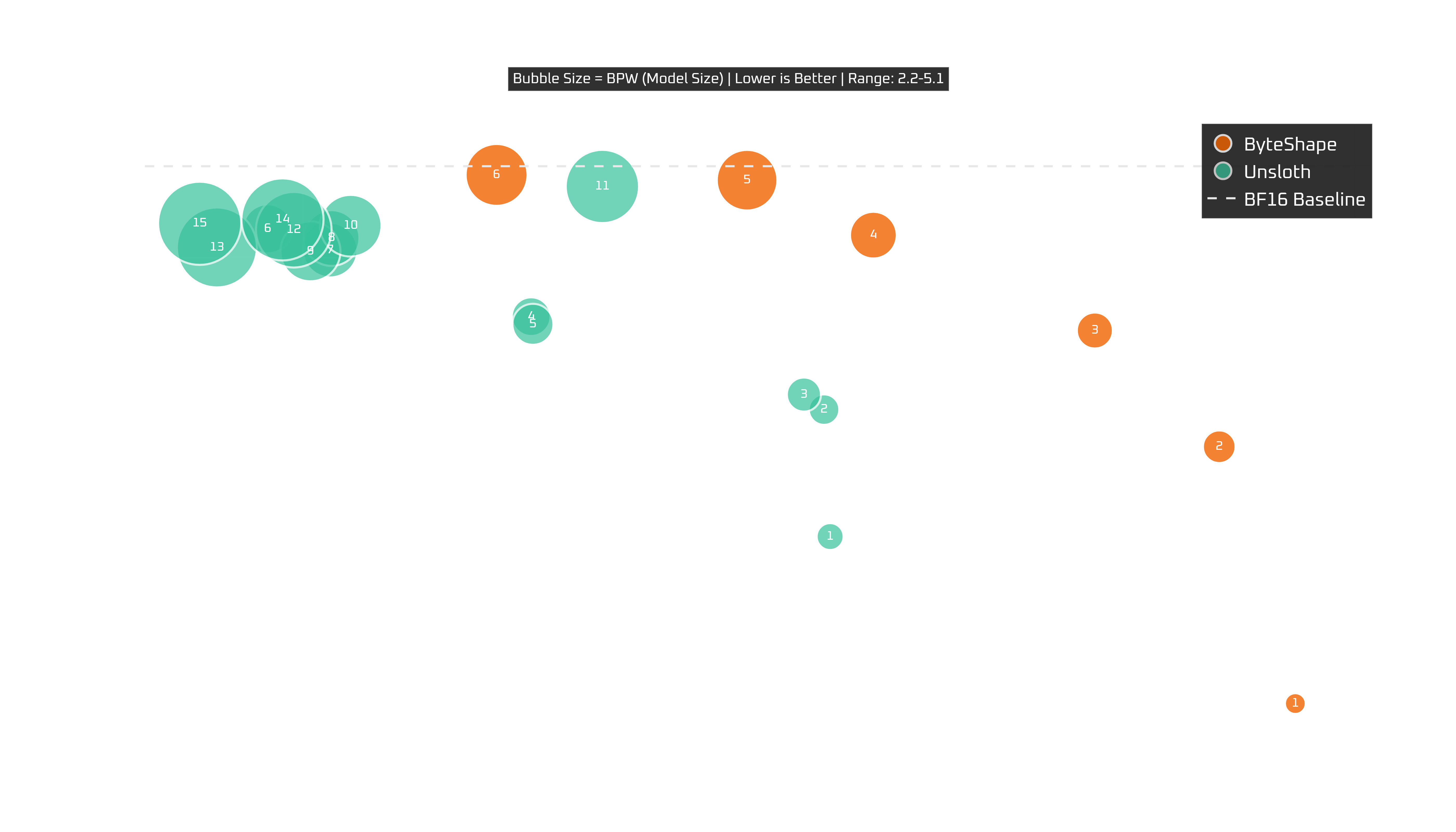
RTX 4090 (24 GB)
Show Legend
| # | Model | Acc | TPS | BPW |
|---|---|---|---|---|
| ByteShape | ||||
| GPU-1 | IQ2_S-2.17bpw | 0.8826 | 183.02 | 2.17 |
| GPU-2 | Q3_K_S-2.73bpw | 0.9387 | 180.49 | 2.73 |
| GPU-3 | Q3_K_S-2.89bpw | 0.9641 | 176.35 | 2.89 |
| GPU-4 | IQ3_S-3.01bpw | 0.9770 | 171.83 | 3.01 |
| GPU-5 | IQ3_S-3.26bpw | 0.9840 | 162.86 | 3.26 |
| GPU-6 | Q3_K_S-3.40bpw | 0.9849 | 168.98 | 3.40 |
| GPU-7 | IQ4_XS-4.06bpw | 0.9969 | 164.77 | 4.06 |
| GPU-8 | IQ4_XS-4.12bpw | 0.9981 | 156.44 | 4.12 |
| Unsloth | ||||
| A | UD-IQ2_XXS | 0.9191 | 167.54 | 2.46 |
| B | UD-IQ2_M | 0.9468 | 167.34 | 2.63 |
| C | UD-Q2_K_XL | 0.9501 | 166.66 | 2.80 |
| D | UD-IQ3_XXS | 0.9671 | 157.59 | 3.02 |
| E | UD-IQ3_S | 0.9654 | 157.65 | 3.13 |
| F | Q3_K_S | 0.9863 | 148.82 | 3.52 |
| G | Q3_K_M | 0.9817 | 150.90 | 3.77 |
| H | UD-Q3_K_XL | 0.9843 | 150.95 | 3.83 |
| I | UD-IQ4_XS | 0.9814 | 150.24 | 4.03 |
| J | UD-IQ4_NL | 0.9870 | 151.58 | 4.11 |
| K | UD-Q4_K_L | 0.9956 | 159.96 | 4.66 |
| L | Q4_K_S | 0.9861 | 149.69 | 4.77 |
| M | MXFP4_MOE | 0.9823 | 147.13 | 4.98 |
| N | Q4_K_M | 0.9884 | 149.31 | 5.08 |
| O | UD-Q4_K_XL | 0.9875 | 146.56 | 5.13 |
Reminder:
- Greyed-out models are shown for completeness. We do not recommend them for this GPU but include them for comparison to the other GPUs where those grayed-out models perform best.
- Striped-infill models are recommended when token generation speed matters more to you than prompt processing.
The 4090 is actually one of the clearest charts here.
GPU-8 is the conservative, practically same-as-baseline quality pick. GPU-7, though, holds essentially baseline quality while adding a meaningful speed boost.
Below those, GPU-6 boosts token generation at the expense of prompt processing and maintains competitive quality. Beyond that, you have several clear choices that trade-off quality for further increases in speed.
So on the 4090:
GPU-7is our recommendation with near-baseline quality and excellent all-around speed,GPU-8if you want the safest near-baseline choice,GPU-4if you need a further boost in speed.
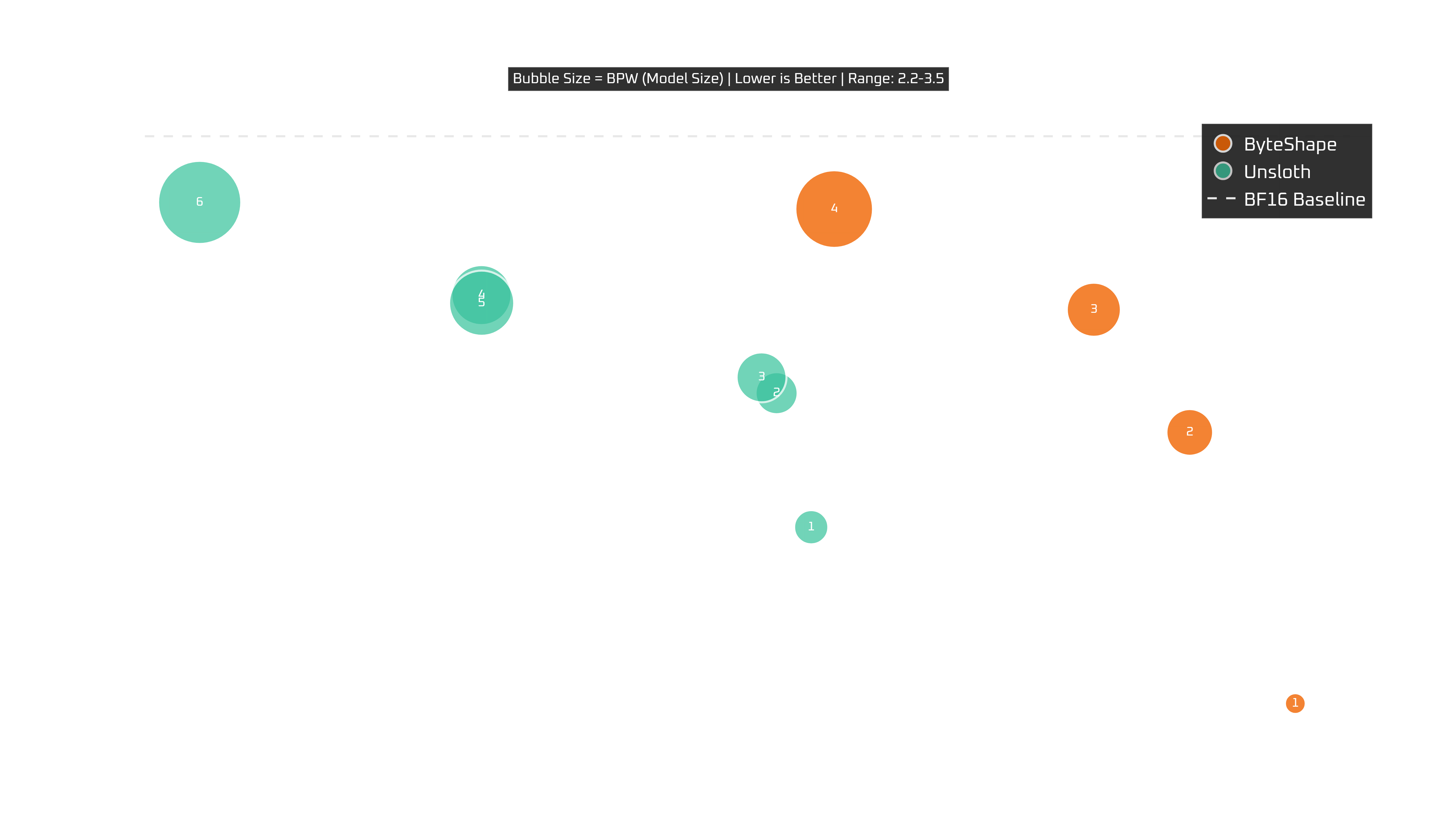
RTX 4080 (16 GB)
Show Legend
| # | Model | Acc | TPS | BPW |
|---|---|---|---|---|
| ByteShape | ||||
| GPU-1 | IQ2_S-2.17bpw | 0.8826 | 160.49 | 2.17 |
| GPU-2 | Q3_K_S-2.73bpw | 0.9387 | 157.17 | 2.73 |
| GPU-3 | Q3_K_S-2.89bpw | 0.9641 | 154.14 | 2.89 |
| GPU-4 | IQ3_S-3.01bpw | 0.9770 | 149.03 | 3.01 |
| GPU-5 | IQ3_S-3.26bpw | 0.9840 | 140.35 | 3.26 |
| GPU-6 | Q3_K_S-3.40bpw | 0.9849 | 145.95 | 3.40 |
| Unsloth | ||||
| A | UD-IQ2_XXS | 0.9191 | 145.23 | 2.46 |
| B | UD-IQ2_M | 0.9468 | 144.14 | 2.63 |
| C | UD-Q2_K_XL | 0.9501 | 143.66 | 2.80 |
| D | UD-IQ3_XXS | 0.9671 | 134.83 | 3.02 |
| E | UD-IQ3_S | 0.9654 | 134.84 | 3.13 |
| F | Q3_K_S | 0.9863 | 125.95 | 3.52 |
Reminder:
- Striped-infill models are recommended when token generation speed matters more to you than prompt processing.
With less VRAM, there are fewer viable options and a more nuanced choice is in order.
GPU-5 is the clear recommendation: it delivers 140+ TPS and 98%+ of baseline quality. That is a very clean trade-off with a maximum of 16K context length.
For larger context, GPU-4 also delivers balanced improvements in speed and 97.7% quality with 32K context.
So for the 4080, the recommendation is straightforward as both models below offer near baseline quality:
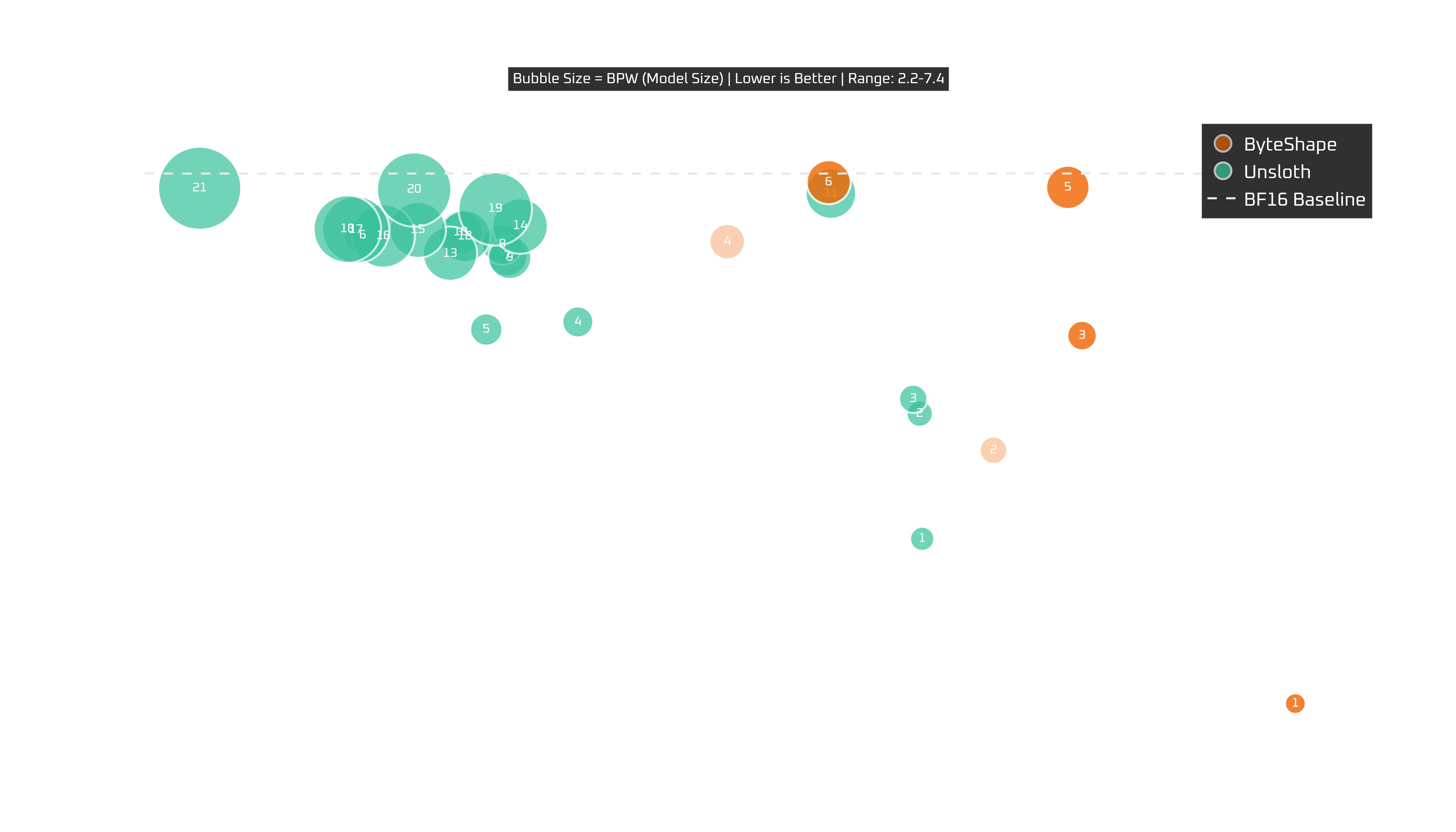
RTX 5090 (32 GB)
Show Legend
| # | Model | Acc | TPS | BPW |
|---|---|---|---|---|
| ByteShape | ||||
| GPU-1 | IQ2_S-2.17bpw | 0.8826 | 202.97 | 2.17 |
| GPU-2 | Q3_K_S-2.73bpw | 0.9387 | 194.92 | 2.73 |
| GPU-3 | Q3_K_S-2.89bpw | 0.9641 | 197.28 | 2.89 |
| GPU-4 | IQ3_S-3.01bpw | 0.9770 | 193.94 | 3.01 |
| GPU-5 | IQ3_S-3.26bpw | 0.9840 | 189.83 | 3.26 |
| GPU-6 | Q3_K_S-3.40bpw | 0.9849 | 187.82 | 3.40 |
| GPU-7 | IQ4_XS-4.06bpw | 0.9969 | 196.91 | 4.06 |
| GPU-8 | IQ4_XS-4.12bpw | 0.9981 | 190.53 | 4.12 |
| Unsloth | ||||
| A | UD-IQ2_XXS | 0.9191 | 193.02 | 2.46 |
| B | UD-IQ2_M | 0.9468 | 192.95 | 2.63 |
| C | UD-Q2_K_XL | 0.9501 | 192.78 | 2.80 |
| D | UD-IQ3_XXS | 0.9671 | 183.84 | 3.02 |
| E | UD-IQ3_S | 0.9654 | 181.40 | 3.13 |
| F | Q3_K_S | 0.9863 | 178.10 | 3.52 |
| G | Q3_K_M | 0.9817 | 181.96 | 3.77 |
| H | UD-Q3_K_XL | 0.9843 | 181.82 | 3.83 |
| I | UD-IQ4_XS | 0.9814 | 182.02 | 4.03 |
| J | UD-IQ4_NL | 0.9870 | 180.71 | 4.11 |
| K | UD-Q4_K_L | 0.9956 | 190.59 | 4.66 |
| L | Q4_K_S | 0.9861 | 180.82 | 4.77 |
| M | MXFP4_MOE | 0.9823 | 180.43 | 4.98 |
| N | Q4_K_M | 0.9884 | 182.30 | 5.08 |
| O | UD-Q4_K_XL | 0.9875 | 179.57 | 5.13 |
| P | Q5_K_S | 0.9862 | 178.65 | 5.73 |
| Q | Q5_K_M | 0.9875 | 177.91 | 6.06 |
| R | UD-Q5_K_XL | 0.9877 | 177.69 | 6.09 |
| S | UD-Q6_K_S | 0.9922 | 181.63 | 6.58 |
| T | Q6_K | 0.9965 | 179.47 | 6.66 |
| U | UD-Q6_K_XL | 0.9967 | 173.75 | 7.40 |
Reminder:
- Greyed-out models are shown for completeness. We do not recommend them for this GPU but include them for comparison to the other GPUs where those grayed-out models perform best.
- Striped-infill models are recommended when token generation speed matters more to you than prompt processing.
This is where Blackwell's preferences really start to stand out. On an RTX 5090 with 32 GB of VRAM, GPU-7 is a clear winner delivering the best overall experience, combining top-tier quality with the fastest speed.
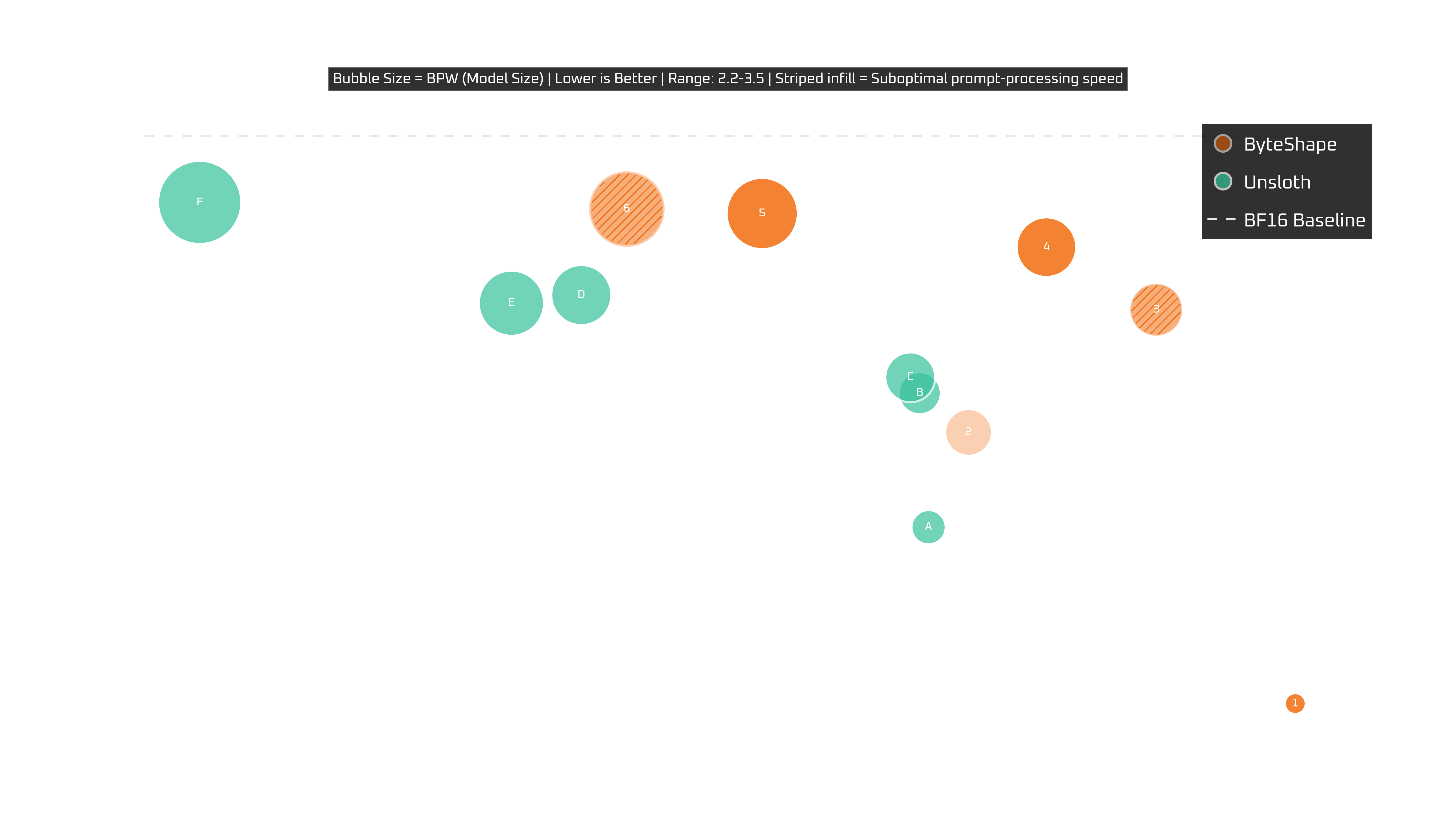
RTX 5060Ti (16 GB)
Show Legend
| # | Model | Acc | TPS | BPW |
|---|---|---|---|---|
| ByteShape | ||||
| GPU-1 | IQ2_S-2.17bpw | 0.8826 | 103.25 | 2.17 |
| GPU-2 | Q3_K_S-2.73bpw | 0.9387 | 96.60 | 2.73 |
| GPU-3 | Q3_K_S-2.89bpw | 0.9641 | 100.42 | 2.89 |
| GPU-4 | IQ3_S-3.01bpw | 0.9770 | 98.18 | 3.01 |
| GPU-5 | IQ3_S-3.26bpw | 0.9840 | 92.40 | 3.26 |
| GPU-6 | Q3_K_S-3.40bpw | 0.9849 | 89.64 | 3.40 |
| Unsloth | ||||
| A | UD-IQ2_XXS | 0.9191 | 95.79 | 2.46 |
| B | UD-IQ2_M | 0.9468 | 95.61 | 2.63 |
| C | UD-Q2_K_XL | 0.9501 | 95.41 | 2.80 |
| D | UD-IQ3_XXS | 0.9671 | 88.72 | 3.02 |
| E | UD-IQ3_S | 0.9654 | 87.29 | 3.13 |
| F | Q3_K_S | 0.9863 | 80.94 | 3.52 |
Reminder:
- Greyed-out models are shown for completeness. We do not recommend them for this GPU but include them for comparison to the other GPUs where those grayed-out models perform best.
- Striped-infill models are recommended when token generation speed matters more to you than prompt processing.
With 16GB there are fewer choices. GPU-5 and GPU-4 offer well balanced speed and quality trade-offs with GPU-5 emphasizing quality whereas GPU-4 delivering a ~5% boost in speed with less than ~1% reduction in quality. GPU-6 fits but it's slower than GPU-5 in token generation and prompt processing speed and its quality is not meaningfully higher. Not recommended here.
Our recommendation:
GPU-5balanced performance and quality trade-off.
RTX Pro 6000 Blackwell Workstation (96 GB)
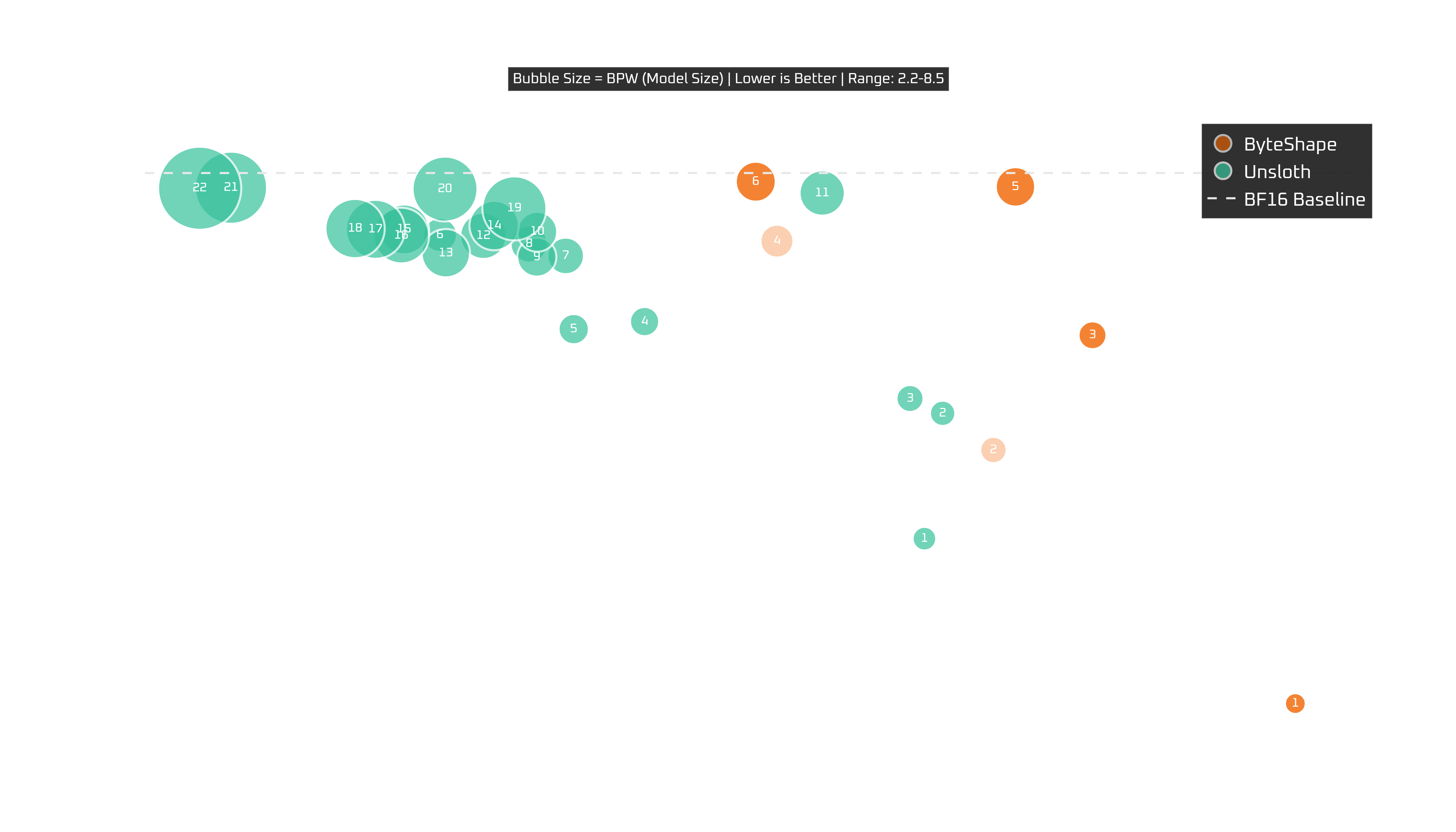
Show Legend
| # | Model | Acc | TPS | BPW |
|---|---|---|---|---|
| ByteShape | ||||
| GPU-1 | IQ2_S-2.17bpw | 0.8826 | 202.77 | 2.17 |
| GPU-2 | Q3_K_S-2.73bpw | 0.9387 | 193.76 | 2.73 |
| GPU-3 | Q3_K_S-2.89bpw | 0.9641 | 196.72 | 2.89 |
| GPU-4 | IQ3_S-3.01bpw | 0.9770 | 195.41 | 3.01 |
| GPU-5 | IQ3_S-3.26bpw | 0.9840 | 188.44 | 3.26 |
| GPU-6 | Q3_K_S-3.40bpw | 0.9849 | 187.31 | 3.40 |
| GPU-7 | IQ4_XS-4.06bpw | 0.9969 | 194.42 | 4.06 |
| GPU-8 | IQ4_XS-4.12bpw | 0.9981 | 186.67 | 4.12 |
| Unsloth | ||||
| A | UD-IQ2_XXS | 0.9191 | 191.71 | 2.46 |
| B | UD-IQ2_M | 0.9468 | 192.25 | 2.63 |
| C | UD-Q2_K_XL | 0.9501 | 191.27 | 2.80 |
| D | UD-IQ3_XXS | 0.9671 | 183.36 | 3.02 |
| E | UD-IQ3_S | 0.9654 | 181.24 | 3.13 |
| F | Q3_K_S | 0.9863 | 177.25 | 3.52 |
| G | Q3_K_M | 0.9817 | 181.00 | 3.77 |
| H | UD-Q3_K_XL | 0.9843 | 179.91 | 3.83 |
| I | UD-IQ4_XS | 0.9814 | 180.14 | 4.03 |
| J | UD-IQ4_NL | 0.9870 | 180.16 | 4.11 |
| K | UD-Q4_K_L | 0.9956 | 188.66 | 4.66 |
| L | Q4_K_S | 0.9861 | 178.55 | 4.77 |
| M | MXFP4_MOE | 0.9823 | 177.43 | 4.98 |
| N | Q4_K_M | 0.9884 | 178.87 | 5.08 |
| O | UD-Q4_K_XL | 0.9875 | 176.18 | 5.13 |
| P | Q5_K_S | 0.9862 | 176.10 | 5.73 |
| Q | Q5_K_M | 0.9875 | 175.33 | 6.06 |
| R | UD-Q5_K_XL | 0.9877 | 174.72 | 6.09 |
| S | UD-Q6_K_S | 0.9922 | 179.47 | 6.58 |
| T | Q6_K | 0.9965 | 177.41 | 6.66 |
| U | UD-Q6_K_XL | 0.9967 | 171.02 | 7.40 |
| V | Q8_0 | 0.9966 | 170.09 | 8.52 |
Reminder:
- Greyed-out models are shown for completeness. We do not recommend them for this GPU but include them for comparison to the other GPUs where those grayed-out models perform best.
- Striped-infill models are recommended when token generation speed matters more to you than prompt processing.
Very similar story to the 5090.
So, for the RTX6000 Pro Blackwell (workstation):
GPU-7is excellent speed and quality.
CPUs
Picking the right quant for CPU proves more straightforward.
Intel Core i7 12700KF
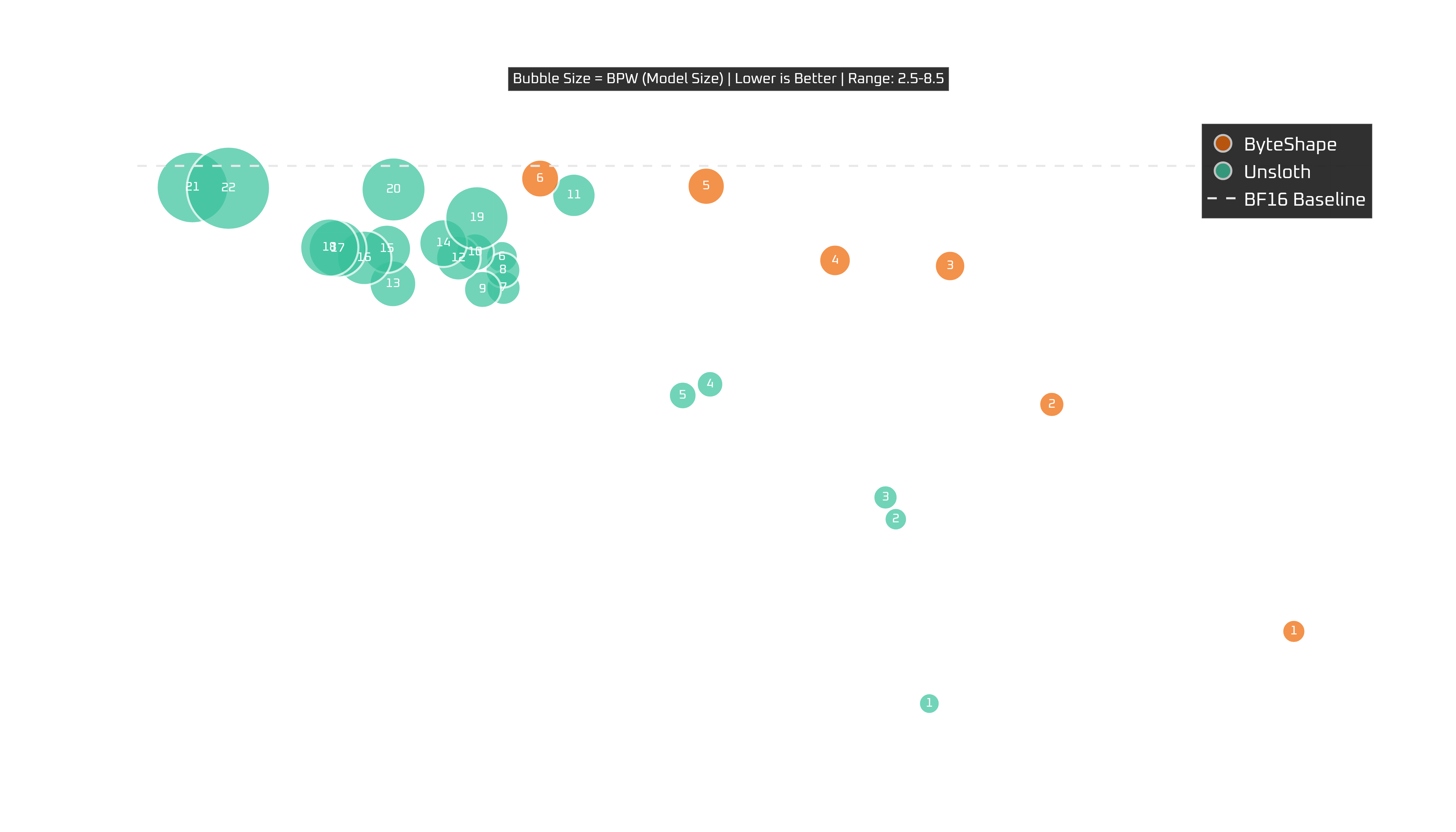
Show Legend
| # | Model | Acc | TPS | BPW |
|---|---|---|---|---|
| ByteShape | ||||
| CPU-1 | Q3_K_S-2.69bpw | 0.9299 | 11.83 | 2.69 |
| CPU-2 | Q3_K_S-2.89bpw | 0.9641 | 10.67 | 2.89 |
| CPU-3 | Q3_K_S-3.40bpw | 0.9849 | 10.18 | 3.40 |
| CPU-4 | Q4_K_S-3.51bpw | 0.9858 | 9.63 | 3.51 |
| CPU-5 | IQ4_XS-4.06bpw | 0.9969 | 9.02 | 4.06 |
| CPU-6 | IQ4_XS-4.12bpw | 0.9981 | 8.23 | 4.12 |
| Unsloth | ||||
| A | UD-IQ2_XXS | 0.9191 | 10.08 | 2.46 |
| B | UD-IQ2_M | 0.9468 | 9.92 | 2.63 |
| C | UD-Q2_K_XL | 0.9501 | 9.88 | 2.80 |
| D | UD-IQ3_XXS | 0.9671 | 9.04 | 3.02 |
| E | UD-IQ3_S | 0.9654 | 8.91 | 3.13 |
| F | Q3_K_S | 0.9863 | 8.04 | 3.52 |
| G | Q3_K_M | 0.9817 | 8.05 | 3.77 |
| H | UD-Q3_K_XL | 0.9843 | 8.05 | 3.83 |
| I | UD-IQ4_XS | 0.9814 | 7.95 | 4.03 |
| J | UD-IQ4_NL | 0.9870 | 7.91 | 4.11 |
| K | UD-Q4_K_L | 0.9956 | 8.39 | 4.66 |
| L | Q4_K_S | 0.9861 | 7.84 | 4.77 |
| M | MXFP4_MOE | 0.9823 | 7.52 | 4.98 |
| N | Q4_K_M | 0.9884 | 7.76 | 5.08 |
| O | UD-Q4_K_XL | 0.9875 | 7.49 | 5.13 |
| P | Q5_K_S | 0.9862 | 7.39 | 5.73 |
| Q | Q5_K_M | 0.9875 | 7.26 | 6.06 |
| R | UD-Q5_K_XL | 0.9877 | 7.22 | 6.09 |
| S | UD-Q6_K_S | 0.9922 | 7.92 | 6.58 |
| T | Q6_K | 0.9965 | 7.53 | 6.66 |
| U | UD-Q6_K_XL | 0.9967 | 6.57 | 7.40 |
| V | Q8_0 | 0.9966 | 6.74 | 8.52 |
CPU-6 is the near-baseline option. CPU-5 is probably the default pick for most people: still very close to baseline quality, but with a bit more speed. CPU-4 is the more aggressive/balanced option, and after that we get into more noticeable quality vs. speed trade-offs.
So, for the i7:
CPU-5is the default recommendation,CPU-6if you want the highest quality,CPU-4if you want more speed without getting too adventurous.
Ryzen 9 5900X
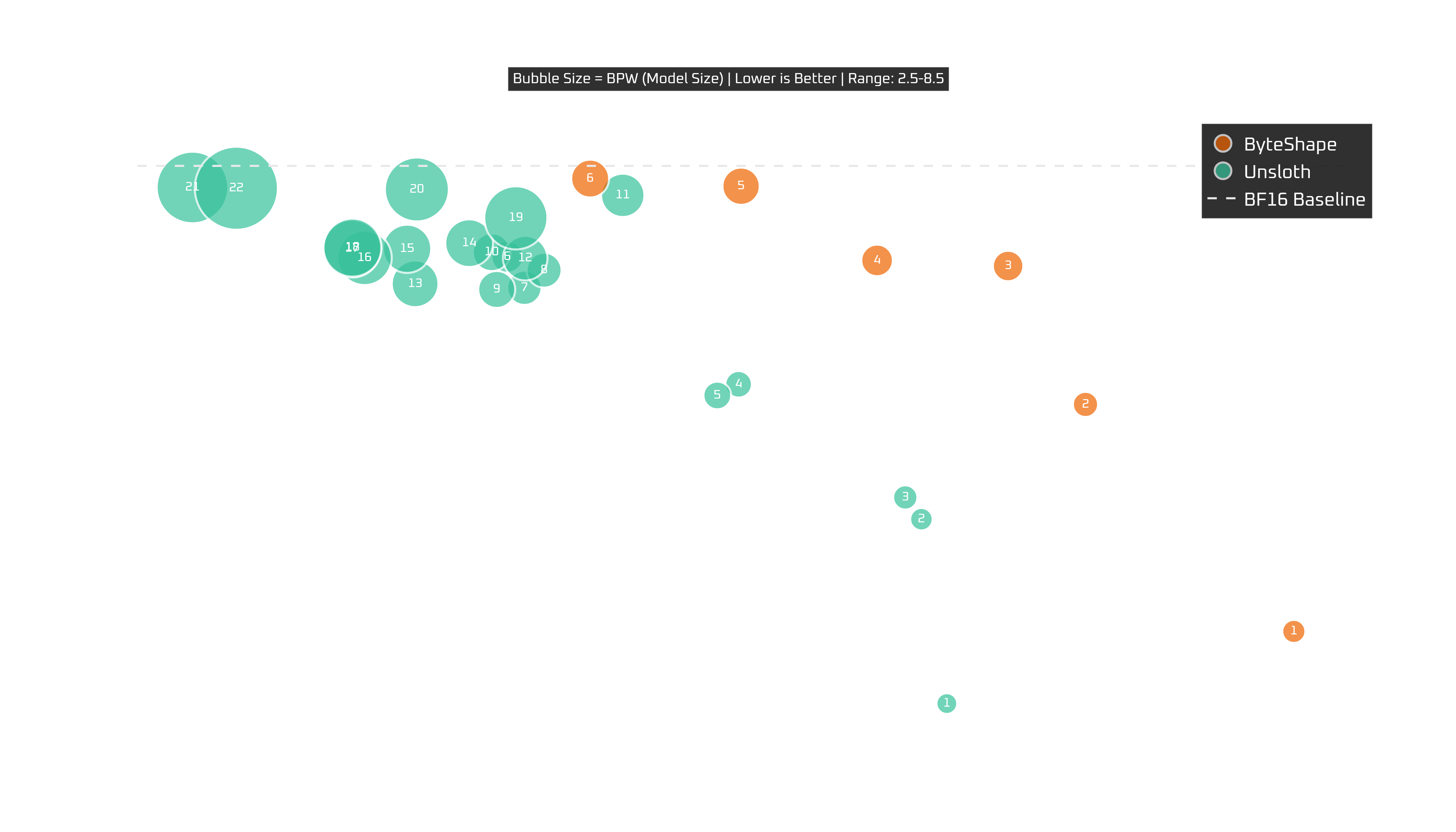
Show Legend
| # | Model | Acc | TPS | BPW |
|---|---|---|---|---|
| ByteShape | ||||
| CPU-1 | Q3_K_S-2.69bpw | 0.9299 | 10.87 | 2.69 |
| CPU-2 | Q3_K_S-2.89bpw | 0.9641 | 10.19 | 2.89 |
| CPU-3 | Q3_K_S-3.40bpw | 0.9849 | 9.94 | 3.40 |
| CPU-4 | Q4_K_S-3.51bpw | 0.9858 | 9.51 | 3.51 |
| CPU-5 | IQ4_XS-4.06bpw | 0.9969 | 9.07 | 4.06 |
| CPU-6 | IQ4_XS-4.12bpw | 0.9981 | 8.57 | 4.12 |
| Unsloth | ||||
| A | UD-IQ2_XXS | 0.9191 | 9.74 | 2.46 |
| B | UD-IQ2_M | 0.9468 | 9.66 | 2.63 |
| C | UD-Q2_K_XL | 0.9501 | 9.60 | 2.80 |
| D | UD-IQ3_XXS | 0.9671 | 9.06 | 3.02 |
| E | UD-IQ3_S | 0.9654 | 8.99 | 3.13 |
| F | Q3_K_S | 0.9863 | 8.30 | 3.52 |
| G | Q3_K_M | 0.9817 | 8.36 | 3.77 |
| H | UD-Q3_K_XL | 0.9843 | 8.42 | 3.83 |
| I | UD-IQ4_XS | 0.9814 | 8.27 | 4.03 |
| J | UD-IQ4_NL | 0.9870 | 8.25 | 4.11 |
| K | UD-Q4_K_L | 0.9956 | 8.68 | 4.66 |
| L | Q4_K_S | 0.9861 | 8.36 | 4.77 |
| M | MXFP4_MOE | 0.9823 | 8.00 | 4.98 |
| N | Q4_K_M | 0.9884 | 8.18 | 5.08 |
| O | UD-Q4_K_XL | 0.9875 | 7.97 | 5.13 |
| P | Q5_K_S | 0.9862 | 7.83 | 5.73 |
| Q | Q5_K_M | 0.9875 | 7.79 | 6.06 |
| R | UD-Q5_K_XL | 0.9877 | 7.80 | 6.09 |
| S | UD-Q6_K_S | 0.9922 | 8.33 | 6.58 |
| T | Q6_K | 0.9965 | 8.01 | 6.66 |
| U | UD-Q6_K_XL | 0.9967 | 7.27 | 7.40 |
| V | Q8_0 | 0.9966 | 7.42 | 8.52 |
Almost the same story as the i7, which is refreshing.
The frontier is clean, the recommendations are clean, and the overall trade-off pattern looks very familiar. Again, CPU-5 remains a great default choice, CPU-6 is the quality-first choice, and CPU-4 is the more speed-oriented alternative.
Ultra 7 265KF
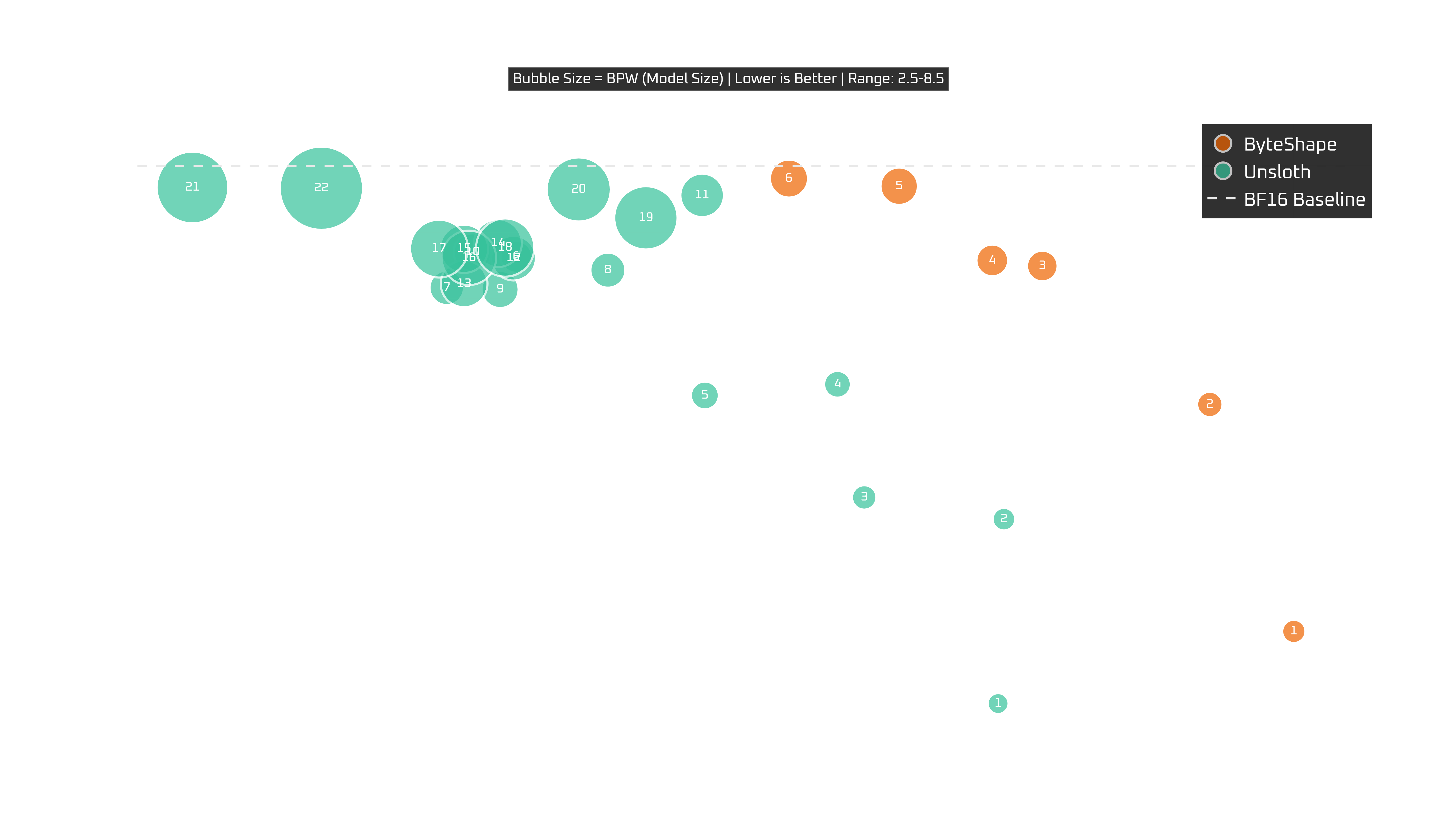
Show Legend
| # | Model | Acc | TPS | BPW |
|---|---|---|---|---|
| ByteShape | ||||
| CPU-1 | Q3_K_S-2.69bpw | 0.9299 | 14.00 | 2.69 |
| CPU-2 | Q3_K_S-2.89bpw | 0.9641 | 13.63 | 2.89 |
| CPU-3 | Q3_K_S-3.40bpw | 0.9849 | 12.90 | 3.40 |
| CPU-4 | Q4_K_S-3.51bpw | 0.9858 | 12.68 | 3.51 |
| CPU-5 | IQ4_XS-4.06bpw | 0.9969 | 12.27 | 4.06 |
| CPU-6 | IQ4_XS-4.12bpw | 0.9981 | 11.79 | 4.12 |
| Unsloth | ||||
| A | UD-IQ2_XXS | 0.9191 | 12.71 | 2.46 |
| B | UD-IQ2_M | 0.9468 | 12.73 | 2.63 |
| C | UD-Q2_K_XL | 0.9501 | 12.12 | 2.80 |
| D | UD-IQ3_XXS | 0.9671 | 12.00 | 3.02 |
| E | UD-IQ3_S | 0.9654 | 11.42 | 3.13 |
| F | Q3_K_S | 0.9863 | 10.60 | 3.52 |
| G | Q3_K_M | 0.9817 | 10.29 | 3.77 |
| H | UD-Q3_K_XL | 0.9843 | 11.00 | 3.83 |
| I | UD-IQ4_XS | 0.9814 | 10.52 | 4.03 |
| J | UD-IQ4_NL | 0.9870 | 10.40 | 4.11 |
| K | UD-Q4_K_L | 0.9956 | 11.41 | 4.66 |
| L | Q4_K_S | 0.9861 | 10.58 | 4.77 |
| M | MXFP4_MOE | 0.9823 | 10.37 | 4.98 |
| N | Q4_K_M | 0.9884 | 10.52 | 5.08 |
| O | UD-Q4_K_XL | 0.9875 | 10.37 | 5.13 |
| P | Q5_K_S | 0.9862 | 10.39 | 5.73 |
| Q | Q5_K_M | 0.9875 | 10.26 | 6.06 |
| R | UD-Q5_K_XL | 0.9877 | 10.55 | 6.09 |
| S | UD-Q6_K_S | 0.9922 | 11.16 | 6.58 |
| T | Q6_K | 0.9965 | 10.87 | 6.66 |
| U | UD-Q6_K_XL | 0.9967 | 9.18 | 7.40 |
| V | Q8_0 | 0.9966 | 9.74 | 8.52 |
The Ultra 7 is just good news all around.
Here again, the same ByteShape models sit on the frontier, but the absolute speeds are better. Sounds familiar? CPU-5 is a great default, CPU-6 is near-baseline pick, and CPU-4 or CPU-3 are there if you want to push harder on speed.
Raspberry Pi 5 (16 GB)
Show Legend
| # | Model | Acc | TPS | BPW |
|---|---|---|---|---|
| ByteShape | ||||
| CPU-1 | Q3_K_S-2.69bpw | 0.9299 | 3.29 | 2.69 |
| CPU-2 | Q3_K_S-2.89bpw | 0.9641 | 3.04 | 2.89 |
| CPU-3 | Q3_K_S-3.40bpw | 0.9849 | 2.96 | 3.40 |
| CPU-4 | Q4_K_S-3.51bpw | 0.9858 | 2.84 | 3.51 |
| Unsloth | ||||
| A | UD-IQ2_XXS | 0.9191 | 2.80 | 2.46 |
| B | UD-IQ2_M | 0.9468 | 2.74 | 2.63 |
| C | UD-Q2_K_XL | 0.9501 | 2.73 | 2.80 |
| D | UD-IQ3_XXS | 0.9671 | 2.58 | 3.02 |
| E | UD-IQ3_S | 0.9654 | 2.53 | 3.13 |
| F | Q3_K_S | 0.9863 | 2.37 | 3.52 |
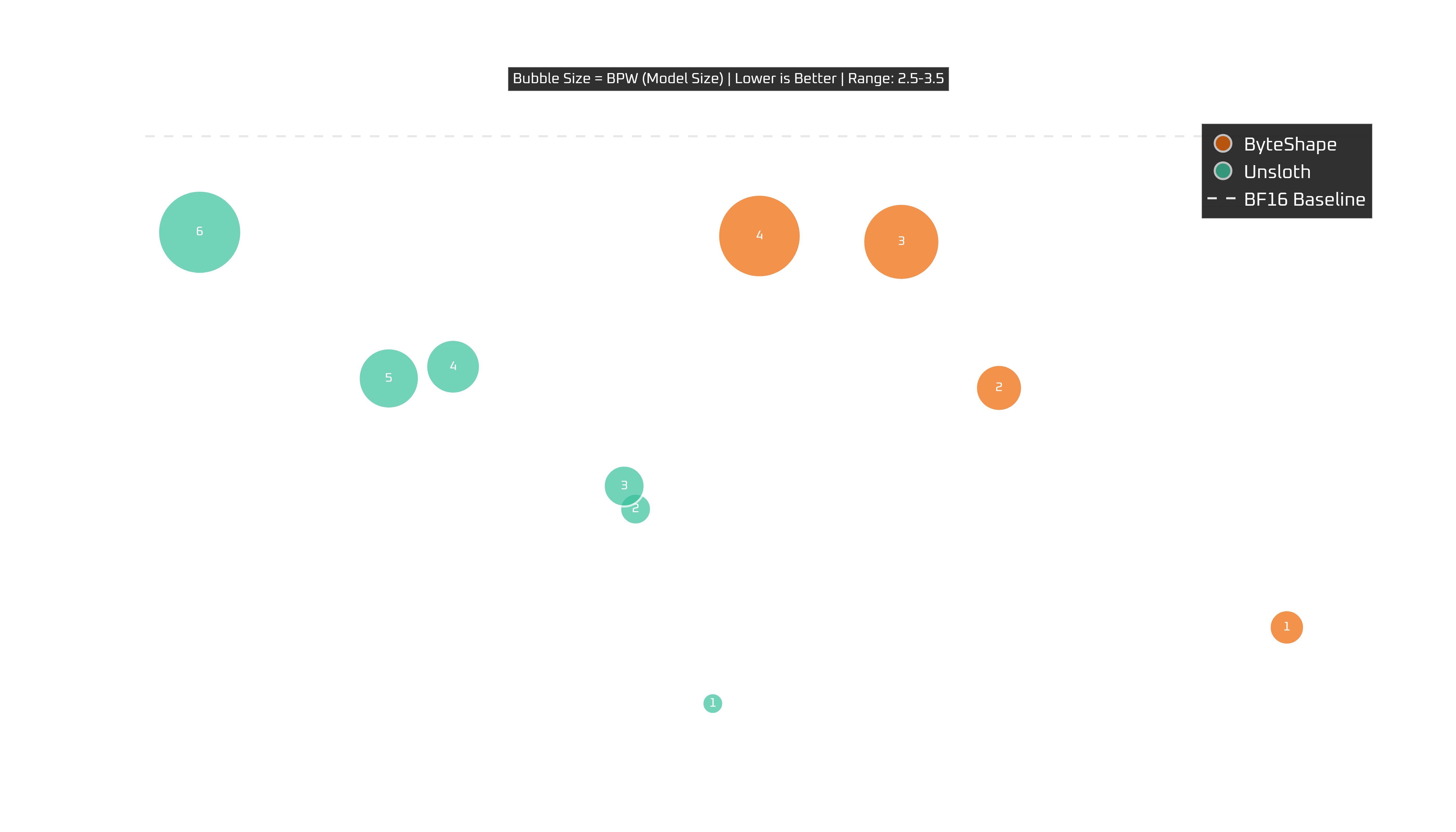
It's alive, barely, but still kicking. For Pi deployments, maybe take a look at Qwen3-Coder which is nearly 3x faster.
CPU-4 and CPU-3 are worth a closer look, landing around the 3 TPS range while keeping quality in a range that is still genuinely usable.
Benchmarking Methodology
Generating our models takes little time. What takes disproportionately longer is evaluating all reported models across the following seven benchmarks:
- BFCL_V3 for tool calling
- GSM8K_V for vision + math
- LiveCodeBench V6 and HumanEval for coding
- GSM8K for math
- IFEVAL for instruction following
- MMLU for general knowledge
The reported score is the mean across these benchmarks, with each benchmark normalized to the original model's score.
We evaluated GSM8K_V in both instruct and thinking modes and
treated them as separate entries in the average. In practice, we observe that the
relative performance between modes remains consistent.
All evaluations were run with llama.cpp b8204.